dfcu Bank USSD – Comprehensive FAQs
A. General Information
- What is the new USSD update about?
The update simplifies USSD banking with:
- A user-friendly menu.
- A new 5-digit M-PIN (replacing app/web passwords).
- Free access (zero-rated – no charges for *240#).
- New features like standing orders, loan services (Mobi-loan, Mo-stock loan), self-onboarding, PIN reset
- Is the USSD code *240# changing?
No, customers and staff will continue using the same code:
*240#.
- What mobile phones support the new USSD service?
All feature & smart phones, including basic phones without internet.
B. Registration & Security
4. How do I register to use *240#?
- Dial *240# → Select language (English/Luganda/Runyakitara/Luo/Lugbara).
- Choose "Yes" to register → Accept Terms & Conditions.
- Enter Account Number + NIN/Passport.
- Create & confirm a 5-digit M-PIN.
- You’ll receive a confirmation SMS.
5. What do I do if I forget my PIN?
- Dial *240# → My Accounts → PIN Management → Forgot PIN → Read and Accept Terms and Conditions.
- Enter National Identification Number (NIN)/Passport Number + Date of Birth → Answer Security Question.
- Create a new M-PIN.
6. Can I change my PIN when I want?
Yes:
- Dial *240# → My Accounts → PIN Management → Reset PIN → Read and Accept Terms and Conditions.
- Enter old PIN → Create new PIN.
7. Is the new USSD system secure?
Yes! It uses:
- 5-digit M-PIN (no complex passwords).
- Security questions for PIN recovery.
C. Features & Services
8. What can I do with the updated *240#?
- My Accounts: Check balance, mini-statement, link/delink accounts, manage standing orders.
- Send Money: To mobile wallets, other dfcu accounts, or other banks.
- Pay Bills: Water, electricity, DSTV, URA, NSSF, GOTv & DSTv,
- Pay School Fees: SchoolPay, SurePay, ZeePay
- Buy Airtime/Data: For MTN & Airtel (self or others).
- Loans: Mobi loans & Mo-stock loans.
- Float Purchase: For MTN, Airtel, and Pay way agents.
- My Approvals: Manage pending transaction approvals.
9. Do I need airtime to access *240# now?
No! Zero-rating means
no airtime charges for using *240#.
D. Troubleshooting & Support
10. What should I do if a transaction doesn’t go through?
- Ensure the M-PIN is correct and account has sufficient balance.
- Check the transaction status under My Accounts → Mini Statement.
- If issues persist, contact:
- Customer Care: 0200 504200
- Toll-Free Help Line: 0800 222000 / 0800 203206
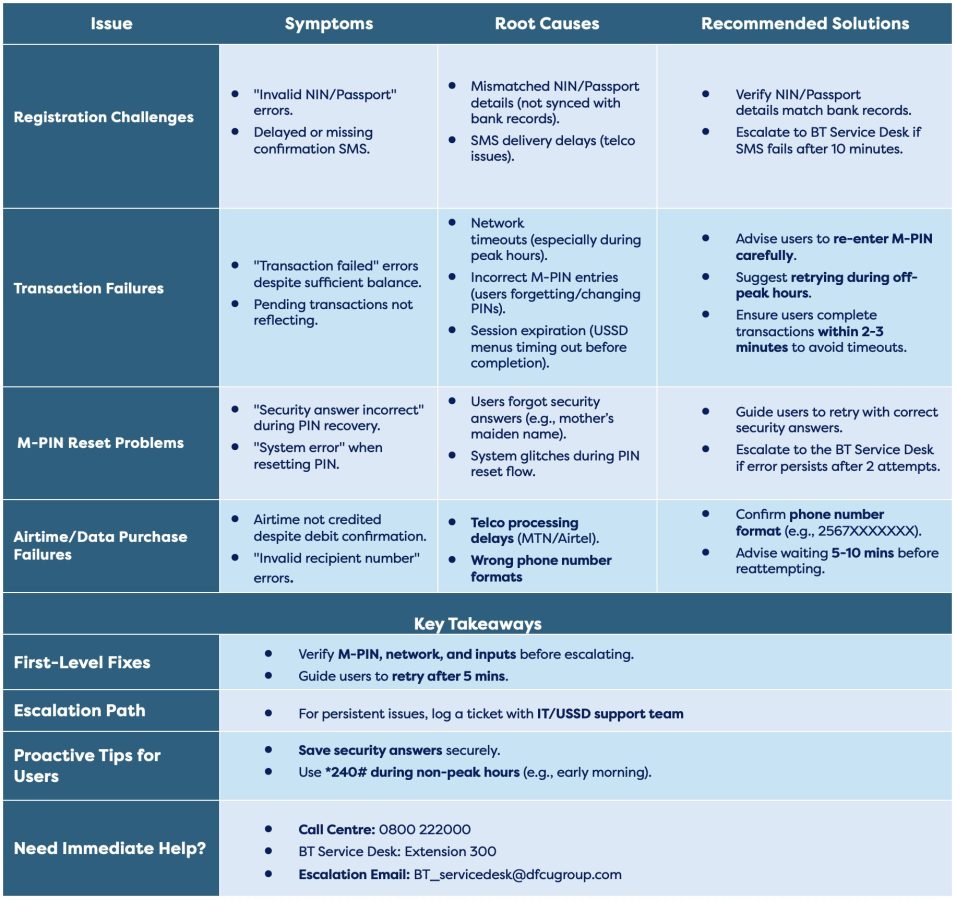
11. What are the most common issues a user could experience?
- Common issues:
- Incorrect inputs (verify account numbers, PINs).
- Network timeouts (ensure stable connection).
12. How is this better than the old USSD system?
- Simpler: M-PIN replaces complex passwords.
- Enjoy additional features: Loans, float purchases, Account Management.
- Free to use: No airtime charges.
- 24/7 availability with better stability.
13. What if I have more than one account—can I access all of them?
Yes! You can
link or
unlink multiple dfcu accounts using the *240# menu:
To link or delink an account:
- Dial *240# → My Account → Link/Delink Account → Answer security question → Enter account number and enter PIN to confirm
14. What if my transaction is stuck waiting for approval?
- Check My Approvals for pending requests.
- Ensure security questions/PIN are correctly entered.
- Escalate to customer care/Service Desk
F. Need More Help?
- Dial *240# for USSD menu.
- Call Toll-Free: 0800 222000.
- Visit a dfcu branch for in-person support.
Thank you for choosing dfcu Bank!
Common Issues